DEXT BOOKKEEPING SERVICE

A Dext bookkeeper for your receipts. Every working day.

Dext is good at reading receipts. Someone still has to check them, code them, publish them and match them to the bank. We do that work inside your existing Dext account, every UK working day, so your books stay current without you living in the review queue.

Book a free call See monthly prices
DDextCosts inbox
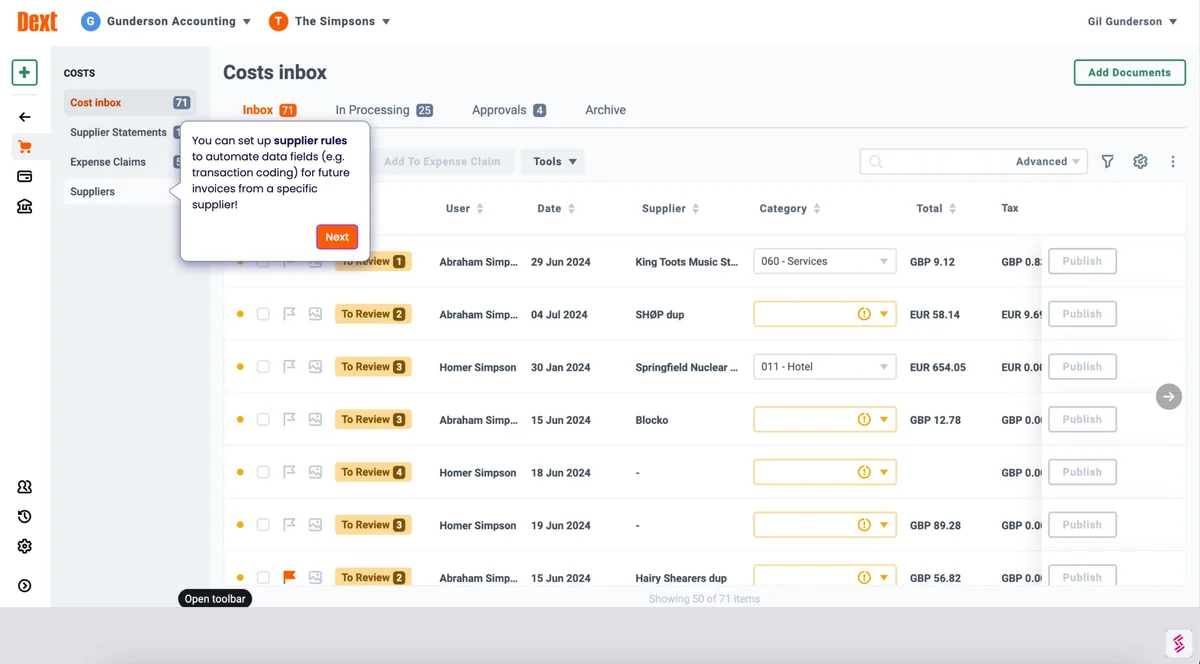
Dext screenshot showing the Costs inbox and supplier invoice review

Your Dext account.
Our daily routine.

XeroQuickBooksSage

HOW THE WORK RUNS IN DEXT

From the receipt arriving
to the bank line matched.

Dext Prepare captures the paperwork. The bookkeeping happens in the steps after it. Here is what we do each working day, in your account, under the access you agree with us.

GETTING PAPERWORK IN

Every route in.
One place to review.

Receipts reach Dext in a few ways. You or your team snap them in the mobile app. Suppliers send invoices to your Dext email-in address, or we forward them there from your finance inbox. For suppliers with online accounts, supplier fetch can pull invoices in on a schedule once you have connected it.

We watch all of these routes. If a supplier keeps emailing the wrong address, we tell you so it is fixed at source.

  • Mobile app uploads checked each working day
  • Email-in address and finance inbox kept in step
  • Supplier fetch connections watched for gaps
DDextInvoices and receipts
Dext screenshot showing the Costs inbox and supplier invoice review

THE REVIEW QUEUE

Checked before it’s published.
Not after.

Dext extracts the supplier, date, total and VAT. Most of the time it is right. The cost of the odd wrong one is high, so we review each item in the queue before it goes anywhere. We check the supplier name, the date, the net, VAT and gross, and whether the VAT on the receipt can actually be claimed.

We look for duplicates here too. A receipt photographed twice, or an invoice emailed and fetched, is flagged and archived instead of posted twice. Anything we cannot settle from the document is noted and raised with you in one list, not a stream of questions.

  • Supplier, date, net, VAT and gross checked
  • Duplicates looked for before items are published
  • Unclear items held and raised in one list

SUPPLIER RULES

Set up once.
Applied every time.

Supplier rules are where Dext saves the most time. For each regular supplier we set the default category, the VAT rate and, where it suits, the payment method. Your fuel card always lands in motor expenses. Your software subscriptions always land in the right cost account. Rules mean consistent coding month after month, which makes your reports easier to read.

  • Default category and VAT rate per supplier
  • New suppliers added as they appear
  • Rules reviewed when your business changes

PUBLISHING AND MATCHING

Published to your books.
Matched to the bank.

Once an item is checked, we publish it from Dext to your accounting software. That is often Xero, QuickBooks or Sage. The bill or expense lands with the image attached, so you and your accountant can see the source document behind the figure.

Then we finish the job in the accounting software. We reconcile the bank feed, matching each card payment and direct debit to the published receipt. A bank line with no receipt behind it goes on the missing list. The result is VAT-ready digital records, which is what Making Tax Digital for VAT expects, with the source document attached wherever you have one. Whoever prepares your VAT return works from checked figures.

Read about our Xero bookkeeping
xXeroBank reconciliation
Xero bank reconciliation screen

MISSING RECEIPTS

The gaps get chased.
Calmly and early.

Most month-end stress comes from a handful of missing receipts. We look for them every working day, not once a month. With your permission, we search the finance inbox you agree with us for the invoice first. If it is there, we send it to Dext and carry on.

If it is not, we follow it up in the way we agree with you. That might be a short weekly list to you or a request to a supplier’s accounts team. At month end you get a monthly summary, with what is still open clearly listed.

  • Finance inbox searched before anyone is asked
  • Follow-ups sent the way you choose
  • Open items listed in your monthly summary

NOT ON DEXT?

Hubdoc and AutoEntry
work too.

Some businesses use Hubdoc, which comes with many Xero subscriptions. Others use AutoEntry alongside Sage or QuickBooks. The routine is the same. Documents come in, we review them, apply supplier settings, publish and reconcile. You keep the receipt tool you already pay for.

No receipt tool at all? We can work directly in your accounting software instead.

QuickBooks bookkeeping service
AAutoEntryInvoice review
AutoEntry invoice review screen with supplier details, VAT and approval controls

DEXT BOOKKEEPING PRICES

One monthly price.
Based on your turnover.

Use your annual turnover to find your starting point. We review your records and workload, then agree one fixed monthly fee, confirmed in your quote. No hourly billing. One entity per package.

FOR SMALL BUSINESSES

Essentials

ANNUAL TURNOVERUp to £150,000

Daily bookkeeping for sole traders, consultants and small businesses who want their time back.

£295/ month

Talk about Essentials
  • Bookkeeping every UK working day
  • Your existing accounting software
  • Bank reconciliation and receipt matching
  • Finance inbox monitoring
  • Missing invoices and receipts followed up
  • Monthly financial summaries

FOR ESTABLISHED BUSINESSES

Managed

ANNUAL TURNOVER£500,000–£5 million

For established teams who need someone keeping the day-to-day books moving across their business.

£795/ month

Talk about Managed
  • Bookkeeping every UK working day
  • Your existing accounting software
  • Bank reconciliation and receipt matching
  • Finance inbox monitoring
  • Missing invoices and receipts followed up
  • Monthly financial summaries

Turnover above £5 million? We’ll prepare a tailored quote. Your Dext and accounting software subscriptions stay in your name and are paid separately. Catch-up work, tax returns, payroll and statutory filings are quoted separately. See full pricing →

DEXT BOOKKEEPING QUESTIONS

Before you
hand it over.

Have another question?
Talk to us →

Do I need to change my Dext account or plan?

No. We work in your existing Dext account. You invite us as a user, and your subscription stays in your name and is paid by you. If we think your current setup is missing something useful, we will tell you and you decide.

What do you actually do in Dext each day?

We check new items in the review queue, correct anything Dext has read wrongly, apply or update supplier rules, archive duplicates and publish checked items to your accounting software. Then we reconcile the bank and follow up anything missing.

Which accounting software can you publish to?

Dext publishes directly to the main packages, including Xero, QuickBooks and Sage. We also work in FreeAgent, Zoho Books, Clear Books, KashFlow, Pandle, QuickFile, FreshBooks and VT Transaction+. Where Dext has no direct link to your software, we agree the route with you before we start.

Our Dext queue is months behind. Can you help?

Yes. A backlog is cleared as a separate catch-up piece of work, quoted on its own. Once it is cleared, the daily service keeps it from building up again. Read about catch-up bookkeeping.

Do you file VAT returns?

VAT returns and other filings are outside the monthly packages and quoted separately. The daily service keeps your records VAT-ready, so whoever files the return is working from checked figures.

How much does a Dext bookkeeper cost?

Essentials is £295 per month for turnover up to £150,000. Plus is £495 per month for £150,000–£500,000. Managed is £795 per month for £500,000–£5 million. The final fixed fee is agreed after we review your records and confirmed in your quote.

LET’S TALK ABOUT YOUR DEXT SETUP

Less time in the queue.
More time on your business.

Tell us how receipts reach you today and which software you publish to. We’ll talk through the routine and the monthly service that fits.

Book a free call [email protected] · 020 7123 9335

Prefer a message? Chat on WhatsApp or go back to the Wenzo home page.

Chat on WhatsApp